Sometimes the built-in tools may not be enough to handle your specific data transformation needs. That is where Code Runner comes in — it allows you to write your own custom Python code inside the workflow, making use of previous step results and returning transformed data.
⚠️ Warning: Always try to use the available built-in tools as much as possible before reaching for Code Runner. Using Code Runner unnecessarily may affect workflow performance.
### Initialize Variable
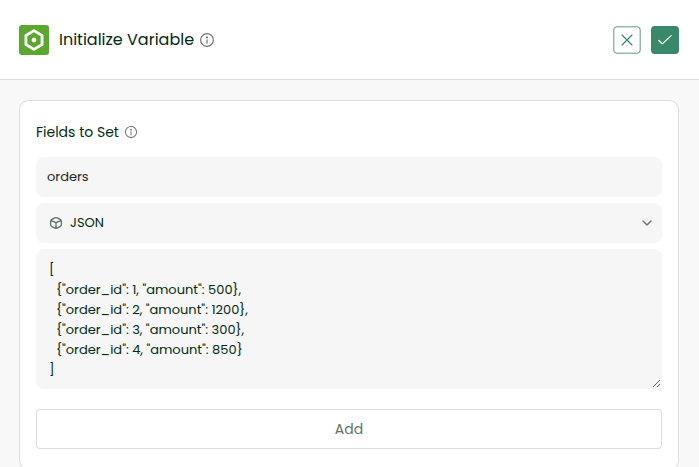
Create a new batch workflow. Initialize a variable called orders as JSON with the following value:
[
  {"order_id": 1, "amount": 500},
  {"order_id": 2, "amount": 1200},
  {"order_id": 3, "amount": 300},
  {"order_id": 4, "amount": 850}
]
### Add Code Runner
Add a Code Runner tool. In the Inputs section, use the initialized variable:
| Name | Value |
| —— | ———————- |
| orders | `{{variables.orders}}` |
In the coding section, write the following Python code to sort the orders by amount:
sorted_orders = sorted(inputs["orders"], key=lambda x: x["amount"])
response = sorted_orders
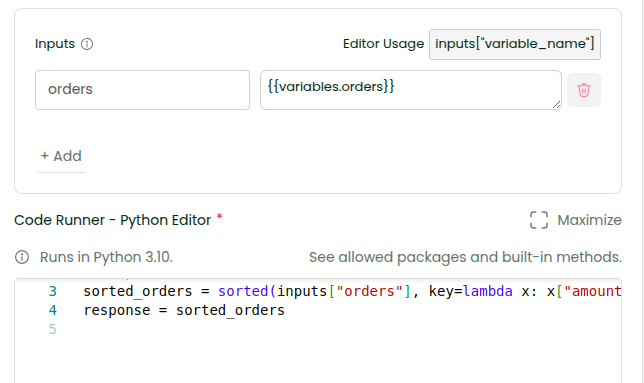
Give title and enable Show Output in Console Log
### Save and Sync
Enable Console Logs for the workflow, save the workflow and click Sync Now. Check the logs.
**Expected Output:**
[
  {"order_id": 3, "amount": 300},
  {"order_id": 1, "amount": 500},
  {"order_id": 4, "amount": 850},
  {"order_id": 2, "amount": 1200}
]
#### 🎉 You have successfully written custom Python code inside your workflow to sort data!
📌 **Things to Keep in Mind:**
**Allowed Packages:** `json, datetime, math, re, time, uuid, base64, hashlib`
**Allowed Built-in Methods:** `abs, all, any, bool, dict, enumerate, filter, float, format, int, isinstance, len, list, map, max, min, range, round, set, sorted, sum, str, tuple, type, zip and all exception classes`
⚠️ **Note:** Any packages or built-in functions outside the above list cannot be used or imported. **The maximum execution time is 30 seconds.**
\