Seven Conversion Options Available:
- JSON to String — Convert structured JSON data into plain text format.
- String to JSON — Convert plain text into structured JSON data.
- XML to JSON — Convert XML formatted data into JSON format.
- JSON to CSV — Convert JSON data into comma-separated values for spreadsheets or exports.
- CSV to JSON — Convert comma-separated data into structured JSON format.
- Generate Timestamp — Create a timestamp for the current date and time.
- Convert Time Zone — Convert time values from one time zone to another.
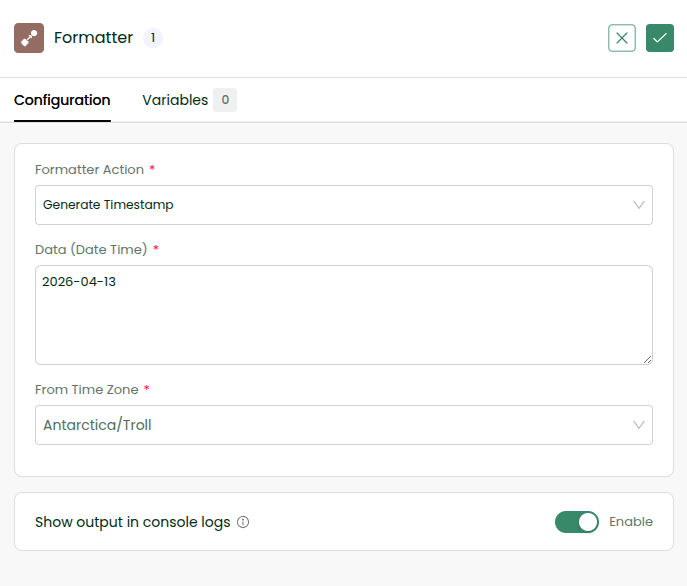
Create a Batch Workflow and use a Formatter tool. Choose the Generate Timestamp option and give a sample date. Enable console log for this step as well as in the Workflow Settings. Save and execute the workflow to find the formatted result.
🎉 You have successfully used a formatter inside your workflow!
\
\
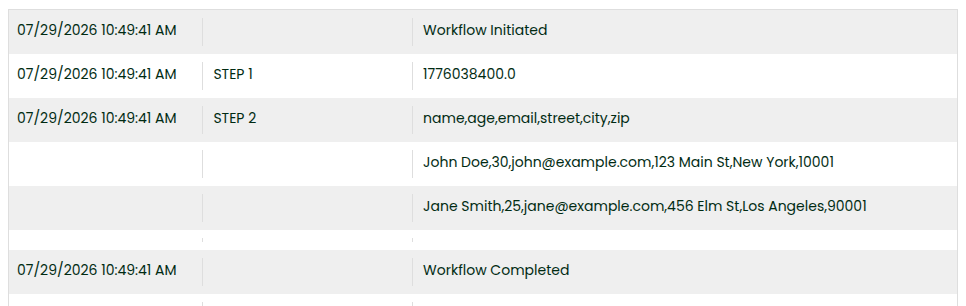
Add another Formatter to Convert JSON to CSV passing
[
  {
    "name": "John Doe",
    "age": 30,
    "email": "john@example.com",
     "street": "123 Main St",
      "city": "New York",
      "zip": "10001"
  },
  {
    "name": "Jane Smith",
    "age": 25,
    "email": "jane@example.com",
      "street": "456 Elm St",
      "city": "Los Angeles",
      "zip": "90001"
  }
]
Enable console log for the step and execute and check logs.